Posts Tagged ‘Windows’

Ubuntu Developer Summit for 13.04 (Raring)

// January 29th, 2013 // No Comments » // Education, Free Software, Jonathan

The War on Time

Whoosh! I’ve been incredibly quiet on my blog for the last 2-3 months. It’s been a crazy time but I’ll catch up and explain everything over the next few entries.

Firstly, I’d like to get out a few details about the last Ubuntu Developer Summit that took place in Copenhagen, Denmark in October. I’m usually really good at getting my blog post out by the end of UDS or a day or two after, but this time it just flew by so incredibly fast for me that I couldn’t keep up. It was a bit shorter than usual at 4 days, as apposed to the usual 5. The reason I heard for that was that people commented in previous post-UDS surveys that 5 days were too long, which is especially understandable for Canonical staff who are often in sprints (away from home) for the week before the UDS as well. I think the shorter period works well, it might need a bit more fine-tuning, I think the summary session at the end wasn’t that useful because, like me, there wasn’t enough time for people to process the vast amount of data generated during UDS and give nice summaries on it. Overall, it was a great get-together of people who care about Ubuntu and also many areas of interest outside of Ubuntu.

Copenhagen, Denmark

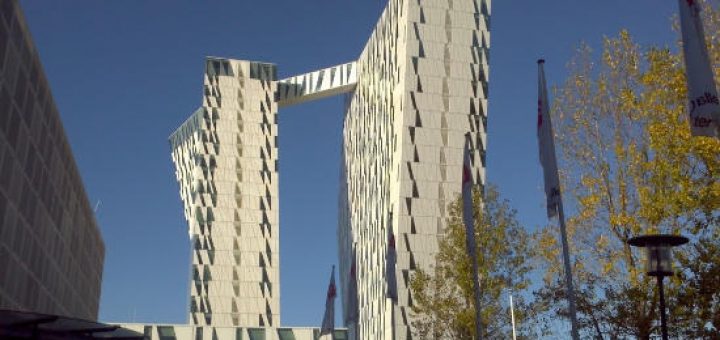
I didn’t take many photos this UDS, my camera is broken and only takes blurry pics (not my fault I swear!). So I just ended up taking a few pictures with my phone. Go tag yourself on Google+ if you were there. One of the first interesting things I saw when arriving in Copenhagen was the hotel we stayed in. The origami-like design reminded me of the design of the Quantal Quetzel logo that is used for the current stable Ubuntu release.

2012-10-28_05-50-14_21

quantal

The Road ahead for Edubuntu to 14.04 and beyond

Stéphane previously posted about the vision we share for Edubuntu 14.04 and beyond, this was what was mostly discussed during UDS and how we’ll approach those goals for the 13.04 release.

This release will mostly focus on the Edubuntu Server aspect. If everything works out, you will be able to use the standard Edubuntu DVD to also install an Edubuntu Server system that will act as a Linux container host as well as an Active Directory compatible directory server using Samba 4. The catch with Samba 4 is that it doesn’t have many administration tools for Linux yet. Stéphane has started work on a web interface for Edubuntu server that looks quite nice already. I’m supposed to do some CSS work on it, but I have to say it looks really nice already, it’s based on the MAAS service theme and Stéphane did some colour changes and fixes on it already.

edu-server-account

edu-server-password

From the Edubuntu installer, you’ll be able to choose whether this machine should act as a domain server, or whether you would like to join an existing domain. Since Edubuntu Server is highly compatible with Microsoft Active Directory, the installer will connect to it regardless of whether it’s a Windows Domain or Edubuntu Domain. This should make it really easy for administrators in schools with mixed environments and where complete infrastructure migrations are planned.

Authentication Options

Choosing machine role

You will be able to connect to the same domain whether you’re using Edubuntu on thin clients, desktops or tablets and everything is controllable using the Epoptes administration tool.

Many people are asking whether this is planned for Ubuntu / Ubuntu Server as well, since this could be incredibly useful in other organisations who have a domain infrastructure. It’s currently meant to be easily rebrandable and the aim is to have it available as a general solution for Ubuntu once all the pieces work together.

Empowering Ubuntu Flavours

This cycle, Ubuntu is making some changes to the release schedule. One of the biggest changes made  this cycle is that the alpha and beta releases are being dropped for the main Ubunut product. This session was about establishing how much divergence and changes the Ubuntu Flavours (Ubuntu Studio, Mythbuntu, Kubuntu, Lubuntu and Edubuntu) could have from the main release cycle. Edubuntu and Kubuntu decided to be a bit more conservative and maintain the snapshot releases. For Edubuntu it has certainly helped so far in identifying and finding some early bugs and I’m already glad that we did that. Mythbuntu is also a notable exception since it will now only do LTS releases. We’re tempted to change Edubuntu’s official policy that the LTS releases are the main releases and treat the releases in between more like technology previews for the next LTS. It’s already not such a far stretch from the truth, but we’ll need to properly review and communicate that at some point.

Valve at UDS and Steam for Linux

One of the first plenaries was from Valve where Drew Bliss talked about Steam on Linux. Steam is one of the most popular publishing and distribution systems for games and up until recently it has only been available on Windows and Mac. Valve (the company behind Steam and many popular games such as Half Life and Portal) are actively working on porting games to run natively on Linux as well.

Some people have asked me what I think about it, since the system is essentially using a free software platform to promote a lot of non-free software. My views on this is pretty simple, I think it’s an overwhelmingly good thing for Linux desktop adoption and it’s been proven to be a good thing for people who don’t even play games. Since the announcement from Valve, Nvidia has already doubled perfomance in many cases for its Linux drivers. AMD, who have been slacking on Linux support the last few years have beefed up their support drastically with the announcement of new drivers that were released earlier this month. This new collection of AMD drivers also adds support for a range of cards where the drivers were completely discontinued, giving new life to many older laptops and machines which would be destined for the dumpster otherwise. This benefits not only gamers, but everyone from an average office worker who wants snappy office suite performance and fast web browsing to designers who work with graphics, videos and computer aided design.

Also, it means that many home users who prefer Linux-based systems would no longer need to dual-boot to Windows or OS X for their games. While Steam will actively be promoting non-free software, it more than makes up for that by the enablement it does for the free software eco-system. I think anyone who disagrees with that is somewhat of a purist and should be more willing to make compromises in order to make progress.

Ubuntu Release Changes

Last week, there was a lot of media noise stating that Ubuntu will no longer do releases and will become a rolling release except for the LTS releases. This is certainly not the case, at least not any time soon. One meme that I’ve noticed increasingly over the last UDSs was that there’s an increasing desire to improve the LTS releases and using the usual Ubuntu releases more and more for experimentation purposes.

I think there’s more and more consensus that the current 6 month cycle isn’t really optimal and that there must be a better way to get Ubuntu to the masses, it’s just the details of what the better way is that leaves a lot to be figured out. There’s a desire between developers to provide better support (better SRUs and backports) for the LTS releases to make it easier for people to stick with it and still have access to new features and hardware support. Having less versions between LTS releases will certainly make that easier. In my opinion it will probably take at least another 2 cycles worth of looking at all the factors from different angles and getting feedback from all the stakeholders before a good plan will have formed for the future of Ubuntu releases. I’m glad to see that there is so much enthusiastic discussion around this and I’m eager to see how Ubuntu’s releases will continue to evolve.

Lightning Talks

Lightning talks are a lot like punk-rock songs. When it’s good, it’s really, really amazingly good and fun. When it’s bad, at least it will be over soon :)

Unfortunately, since it’s been a few months since the UDS, I can’t remember all the details of the lightning talks, but one thing that I find worth mentioning is that they’re not just awesome for the topic they aim to produce (for example, the one lightning talks session I attended was on the topic of “Tests in your software”), but since they are more demo-like than presentation-like, you get to learn a lot of neat tricks and cool things that you didn’t know before. Every few minutes someone would do something and I’d hear someone say something like “Awesome! I didn’t know you could do that with apt-daemon!”. It’s fun and educational and I hope lightning talks will continue to be a tradition at future UDSs.

Social

Stefano Rivera (fellow MOTU, Debianista, Capetonian, Clugger) wins the prize for person I’ve seen in the most countries in one year. In 2012, I saw him in Cape Town for Scaleconf,  Managua during Debconf, Oakland for a previous UDS and Copenhagen for this UDS. Sometimes when I look at silly little statistics like that I realise what a great adventure the year was!

Between the meet ‘n’ greet, an evening of lightning talks and the closing party (which was viking themed and pretty awesome) there was just one free evening left. I used it to gather with the Debian folk who were at UDS. It was great to see how many Debian people were attending, I think we had around a dozen or so people at the dinner and there were even more who couldn’t make it since they work for Canonical or Linaro and had to attend team dinners the same evening. It was as usual, great to put some more faces to names and get to know some people better.

It was also great to have a UDS with many strong technical community folk present who is willing to engage in discussion. There were still a few people who felt missing but it was less than at some previous UDSs.

I also discovered my face on a few puzzles! They were a *great* idea, I saw a few people come and go to work on them during the week, they seem to have acted as good menial activities for people to fix their brains when they got fried during sessions :)

2012-10-31_14-32-28_374

Overall, this was a good and punchy UDS. I’ll probably not make the next one in Oakland due to many changes in my life currently taking place (although I will remotely participate), but will probably make the one later this year, especially if it’s in Europe. I’ll also make a point of live-blogging a bit more, it’s just so hard remembering all the details a few months after the fact. Thanks to everyone who contributed their piece in making it a great week!

SociBook del.icio.us Digg Facebook Google Yahoo Buzz StumbleUpon

Fonts in Edubuntu

// December 21st, 2010 // 2 Comments » // Education, Free Software

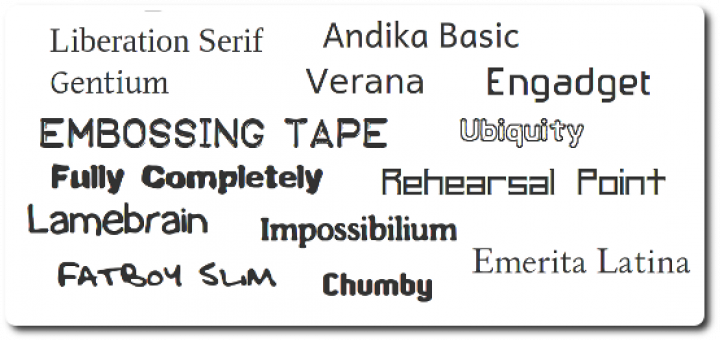
Every now and again, educators ask me where they can get more fonts for Edubuntu. We include great desktop publishing software (scribus-ng, inkscape, gimp, etc) in Edubuntu, but our default font selection is rather dry and uninspiring. A few weeks back I looked whether there are some nice fonts in the Ubuntu archive that we could include. I figured that even if there’s one or two good ones available that we could ship, then it would at least be some improvement. The results were quite surprising, there are a wealth of fonts available in the archives.

I added many of them that seemed useful at face value to the edubuntu-fonts meta-package now available in PPA and soon in Natty. It installs quite a lot of font packages currently. The idea is to cut it down a bit and probably split it into 2 to 4 meta-packages, possibly in the categories I listed below. I’ll include some excerpts from package descriptions, and a few examples too. I can’t possibly list them all, it would make this post way too long.

Educational

Font packages currently included: ttf-essays1743, ttf-junicode, ttf-levien-typoscript, ttf-linex, ttf-marvosym, ttf-oflb-asana-math, ttf-oflb-euterpe, ttf-sil-andika, ttf-ancient-fonts, ttf-inconsolata, otf-stix

ttf-sil-andika

Upstream Homepagehttp://scripts.sil.org/Andika

Andika (“Write!” in Swahili) is a sans serif, Unicode-compliant font designed especially for literacy use, taking into account the needs of  beginning readers. The focus is on clear, easy-to-perceive letterforms that  will not be easily confused with one another. A sans serif font is preferred by some literacy personnel for teaching  people to read. Its forms are simpler and less cluttered than some serif fonts can be. For years, literacy workers have had to make do with fonts that were available but not really suitable for beginning readers and writers. In some cases, literacy specialists have had to tediously cobble together letters from a variety of fonts in order to get the all of characters they need for their particular language project, resulting in confusing and unattractive publications. Andika addresses those issues.

ttf-linex

Upstream Homepage: http://gata.linex.org/trac/browser/ttf-linex/

A collection of fonts including hand-writing simulation typographies, ancient Greek and Roman typographies, institutional fonts from the Extremadura regional government and other elegant fonts.

otf-stix

Upstream Homepage: http://www.stixfonts.org

The mission of the Scientific and Technical Information Exchange (STIX)  font creation project is the preparation of a comprehensive set of fonts that serve the scientific and engineering community in the process from  manuscript creation through final publication, both in electronic and print formats.

Substitutes for popular Non-Free fonts

Font packages currently included: ttf-liberation, ttf-century-catalogue, ttf-mgopen, ttf-beteckna, ttf-droid, ttf-ecolier-court, ttf-ecolier-lignes-court, ttf-bpg-georgian-fonts, ttf-adf-verana, ttf-goudybookletter, ttf-levien-museum, ttf-linux-libertine, ttf-adf-universalis, ttf-adf-tribun, ttf-adf-switzera, ttf-adf-romande, ttf-adf-oldania, ttf-adf-libris, ttf-adf-irianis, ttf-adf-ikarius, ttf-adf-gillius, ttf-adf-berenis, ttf-adf-baskervald, ttf-adf-accanthis, otf-freefont, ttf-symbol-replacement

ttf-liberation

Upstream Homepage: https://fedorahosted.org/liberation-fonts/

This is one of the most well-known sets of substitution fonts. It’s sponsored by Red Hat and includes a set of fonts that are metrically similar to the Times, Arial and Courier fonts. It’s great for document compatibility and can act as a drop-in replacement without requiring the installation of Microsoft fonts.

ttf-symbol-replacement

This is a replacement for the Symbol font as commonly found on Windows systems. It’s from the Wine project and should work as a drop-in replacement.

Desktop Publishing

ttf-engadget, ttf-okolaks, ttf-opendin, ttf-radisnoir, ttf-rufscript, ttf-sil-gentium, ttf-tomsontalk, ttf-atarismall, ttf-breip, ttf-staypuft, ttf-aenigma, ttf-fifthhorseman-dkg-handwriting, ttf-isabella, ttf-sjfonts, ttf-georgewilliams, ttf-femkeklaver, ttf-adf-mekanus, ttf-dustin

These are all font packages that might be useful for desktop publishing in a school or educational environment. The ttf-aenigma font package alone includes more than 450 thematic fonts that could be used for posters, brochures, etc!

Enhanced Usability or Accessibility

Font packages currently included: ttf-tiresias

ttf-tiresias

Upstream Homepage: http://www.tiresias.org/fonts/

This is a family of realist sans-serif typefaces that were designed for best legibility by people with impaired vision at the Scientific Research Unit of Royal National Institute of the Blind in London. This is a family of realist sans-serif typefaces that were designed for best legibility by people with impaired vision at the Scientific Research Unit of Royal National Institute of the Blind in London.

Oh, is that all?

Nope, that’s the beginning. Once we have a good selection of fonts in Edubuntu based on what’s in the archive, we should also extend and find more good fonts to include in the Ubuntu archives.Getting the fonts from the Google Font Directory packaged would be a good next step. If you know of any other sources that we should look into please comment here or on one of the usual Edubuntu communication channels.

SociBook del.icio.us Digg Facebook Google Yahoo Buzz StumbleUpon

Can Wireless Help Develop a Silicon Cape?

// May 24th, 2010 // 2 Comments » // Free Software, Project Mayhem

The Silicon Cape in a nutshell

Cape Town is Africa’s own little Silicon Valley, or in some way at least, becoming that. We have many locals who are passionate about technology and what it can do for our country and our continent who are also completely willing to share their knowledge and help and teach others while at the same time, growing local industry. We have user groups such as the Cape Town Linux Users Group (CLUG) who provide regular talks on technical and beginner Linux topics twice a month. We also have the Cape Town Python Users Group (CTPUG), the Cape Town Ruby Brigade and the Cape Town Wireless Users Group (CTWUG) on which I’ll expand later. These are just a few of the local technology volunteer support groups we have and there are much more. There are also many technology companies that have development offices here, such as Amazon.com, Yola and Thawte (which was also founded in Cape Town). There’s always new technology and software startups all the time and there’s a few local venture capital firms that focus specifically on technology funding. A group of people who are passionate about making Cape Town more of a local Silicon Valley created the organisation called Silicon Cape, which aims to bring together local entrepreneurs and geeks to help make the Silicon Cape vision a realA large, free and open network that connects the city could do wonders for our local technology development.ity. Silicon Cape has also attracted interest from our former mayor and now the premier of our province, Helen Zille who realises how important technology is to our local economical development.

Cape Town Wireless Users Group

I joined CTWUG around 4 years ago, it used to be just small pockets of people connecting to each other, later these smaller groups were connected and today, CTWUG covers large parts of Cape Town where you can reach any part of the network from any node. It has even extended outside of the larger Cape Town area into areas such as Stellenbosch and there’s also a vibrant community in Paarl that are connected to each other and hopefully some day, directly to the rest of the WUG.

Many are quick to dismiss Wireless User Groups as networks where people just share files and pirate content. There is certainly a lot of file sharing happening on the WUG, and in some cases there will be some piracy, but as with any big network it’s almost impossible to police. The WUG does provide a lot more than file-sharing though. Across South Africa, Internet is quite expensive and in many cases, prohibitively so. We have many users that don’t have any Internet connection at home, and we don’t explicitly provide any Internet access on the network. Instead, some users run Internet-like services on the WUG. So some users who do have an Internet connection will do things like run an email server that allows users to send and receive e-mail to the rest of the WUG as well as the rest of the world. There’s also a Jabber server that federates with other Jabber servers on the Internet. I run a few services myself. There’s CTWUG Statusnet which is a Statusnet installation that brings microblogging to the WUG, there’s Wugtube which hosts user uploaded video content and also a Big Blue Button installation for video conferencing and chatting. Besides the 3 services I host there’s lots of other services hosted on the network which includes a Facebook clone, a Teamspeak server, many gaming servers, personal wug sites and repositories and CD images for many Linux distributions as well as Windows and OSX updates.

The wug certainly can’t replace an Internet connection completely, but it works great as a secondary network to the Internet and also for people who simply can’t afford an Internet connection. Even for those who do have an Internet connection, there’s still a lot of benefit to getting connected. By installing system updates, for example, you would only get about 419 KB/s on DSL (or at least, that’s what I get on my 4mbps line which is Telkom’s current fastest offering) while installing from the WUG would typically give you up to 1.2 MB/s (and even more) depending one your location and the mirror you’re using. Currently we only have around 500 people actively using the WUG. One of my personal goals is to get schools involved. We have a few hundred schools in Cape Town and most of them have no Internet or often, they have to share a 3GB monthly package among the whole school that typically only the admin staff and some teachers will have access too. Hosting mirrors of Wikipedia, Wikinews and other useful sites, along with the usual WUG services could have great impact for these schools in my opinion. There’s a seperate project for connecting schools together called Schoolwan that connected 35 schools to each other and to a centralised server for content, mail, etc. Even though it’s a really, really cool project, I believe that it would’ve been a lot better if it had decent funding and if the benefits of using a network such as this could be properly introduced with some good cultivation. With CTWUG schools could gain some benefit of connecting to an existing network with existing infrastructure and a large volunteer community. CTWUG has strict rules about pornography and adult content and users who share any such content publicly on the networked are disconnected without any warning.

There’s also a local project called Wizzy Digital Courier which started off as a Sneakernet e-mail service where schools could carry around their e-mail on USB disks and sync up using UUCP. With the Wizzy project also came the concept of a Wizzy server, which would dial-up after 19:00 when phone calls are cheaper and gets the content requested during the day and stores it in a wwwoffle proxy so that users could visit the websites they have requested the previous day. Many Schoolwan schools also had a Wizzy server. One idea is that some of the more resourced schools who have uncapped DSL could share their off-peak bandwidth to get and cache some data for the less-privileged schools using something like a Wizzy server.

There’s a lot I’d like to say on the topic and I’ve only touched a few things here, the point that I’d like to get to is that wide-area wireless networks can be extremely useful in areas where Internet is either slow or expensive, and probably too even so when a good Internet connection is available.

Cape Town to get City-wide Wireless

ITweb reports that there are plans to roll out fiber-backed wireless throughout the city. A R400m (about €41.2m) plan to roll out this fiber network was planned when Helen Zille was still the mayor of Cape Town. This alone will save the city about R90m a year in costs to Telkom and other operators to our municipalities.

There’s little information available on who will be able to access the network or with which networks it will peer with, but it has great potential and I hope that it will grow in to a network that will add value to as many people in the city as possible.

SociBook del.icio.us Digg Facebook Google Yahoo Buzz StumbleUpon

LTSP Cluster Website

// January 29th, 2010 // No Comments » // Free Software

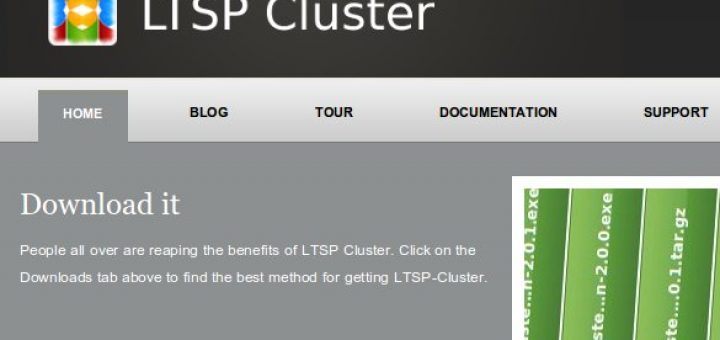
For the past few months I’ve been working on the LTSP-Cluster team at Revolution Linux. Today we’re releasing the website so that we can tell the world what we’ve been doing!

LTSP-Cluster is a set of tools and plugins for LTSP that allows you to extend LTSP so that it can scale up to hundreds of servers and thousands of LTSP clients. It has a nice web interface for your LTSP configuration, does load balancing between your servers and more. It can even connect your LTSP thin client to a cluster of Windows terminal servers or NX servers, if you’re into that sort of thing. If you’re deploying LTSP soon, you’d probably want to investigate LTSP-Cluster, and I’m not just saying it because I’m involved in the project :)

It’s licensed under the GPLv3 license and supported by the LTSP community, you can also get commercial support *wink* *wink* from Revolution Linux where plenty of very skilled people are ready for your LTSP related needs.

SociBook del.icio.us Digg Facebook Google Yahoo Buzz StumbleUpon

Haiku

// September 18th, 2009 // 9 Comments » // Free Software

BeOS and I

A little more than a decade ago, I used to love BeOS. It booted faster, was more stable and reacted much better than Windows 98, which I was using as my main OS at that time. I hoped to see it expand and take over from Windows as the dominant operating system in the world. This was before I knew about free software. I was very unhappy when Be Inc went down and sold BeOS to Palm. They managed to release some code under open source licenses before that happened, but since then BeOS was pretty much dead. It was also right about then when I started playing around with Red Hat Linux.

Enter Haiku

In 10 years things have changed quite a lot, and a group of people have been working on a complete BeOS replacement called Haiku (also previously known as OpenBeOS) that’s released under the MIT license. They announced a new alpha release today so I thought I’d give it a spin.

Haiku Installer

Haiku Installer

The Good

It boots very fast with no annoying flashes or disturbances during the boot process. I guess it would do a very good job of replacing any legacy BeOS 5 systems that are still out there already. The interface is also very responsive, and the installer isn’t too bad either, although it crashed when I only gave the virtual machine 64MB of RAM, which it runs fine on after installation, it installed fine having 128MB of RAM. BeOS is nice for very small devices. It should give you decent performance on even a Pentium II machine. My old BeOS 5 machine used to be a 75mhz Pentium with 32MB of RAM and it used to run just fine.

Haiku Desktop

Haiku Desktop

The Bad and the Ugly

Pretty much everything that happened in the last 10 years is in the rest of the world is in a horrible state in Haiku. USB support is dodgy, power management is basically non-existent… oh, and if you want Wi-Fi, it’s fine as long as you have an Atheros card and only want to connect to unsecured networks. It’s essentially useless for laptops.

Even though it’s a unixy system, it’s still a single-user system. Everything is owned and ran by user “user” and group “root”, and there are no plans yet for fixing this. The /etc/passwd file literally just contains one entry. If I run the program called “teapot”, my configuration gets stored in /etc/teapot, not in my home directory! In my opinion the time for single user desktop systems have long gone, and it might have been ok in the mid 90′s where you just had to compete with Windows 98, but these days it’s really not sufficient. People have come to expect their computers to be much more safe and secure than that.

I think BeOS was a real nice system, and in many ways ahead of its time, but it’s dead and I think it’s best if they rather just leave it that way. I can’t see the point in spending another 2-3 years to make a system that is already obsolete in design, when those efforts could rather be spent on more worthy projects. Perhaps I’m just biased since I’m a big fan of GNU/Linux, we’ll just have to see.

SociBook del.icio.us Digg Facebook Google Yahoo Buzz StumbleUpon

Phone Choice

// September 13th, 2009 // 19 Comments » // Free Software, Gadgets

My phone contract renewal is up in about a month and I’ll be eligible for a new phone. I’m not sure I know what exactly I want yet, but I thought I’d blog about my thinking around new phones and the contenders.

I love my current phone. Probably enough that I can use it for another 2 years. It’s showing its age though, and it feels so unprogressive getting the same one again. It’s a Motorola V8 (RAZR2). What I like about it is that it works great as a phone. Many devices have so many gadgets, features and gimmicks but somehow they neglect the phone part. This phone has good sound quality and reception and I like the way I can read SMS’s on the outside display and how it reads out who send me an SMS. While there’s lots of things I like about the phone, it’s pretty much in the past soon so I’ll lay out what I want in a future one.

I like clamshell phones (no need to lock keypads). I have a friend with a very fancy looking smartphone where he has to press more than 5 buttons just to enter a number to call. That sucks. Good sound quality and a good (GSM) radio is important. That was where it started, some basic requirements for a simple phone that does the job well. However, playing with my friends’ iPhones, Android devices and Blackberries, I’ve realised that I might actually have some use for a decent smart phone.

Nokia E71

200px-Nokiae71

I had a Nokia E61 previously and didn’t like it. The sound quality was horrible and I found Symbian to be incredibly annoying. A while back I played around with a friend’s Nokia E71. It’s a major improvement. It’s not as clunky or plasticky as the E61 was. It’s actually a very solid phone, and it has a beautiful big display for the size of the phone, which is just slightly larger than my RAZR2. Its metal finishes are great and I’d daresay that it’s the best built Nokia phone I’ve ever handled. Symbian is also being open sourced, so hopefully many of the old annoyances would also be cleared out. It also has a nice (although slightly gimmicky) feature where it remembers where you parked your car using its integrated GPS. This was the phone I was thinking of buying a few months back when I first started looking at phones. I can’t say that I have very strong feelings for or against this phone otherwise.

iPhone

281px-Iphone2g3g3gson

The iPhone has been revolutionary and has made a big impact on how we think about smart phones. They’re also readily available and quite cheap. It has a massively wide variety and amount of applications available for it. It’s not the proprietary system that it runs that bothers me so much, it’s more the freedom hating nature of Apple’s products. I’ve heard of someone from the UK visiting South Africa and plugging in their iPhone just to get it charged, and it changed the country settings automatically not allowing the person to access any of the apps they downloaded in the UK. While the iPhone seems like a nice device, I can’t say that I’m particularly interested. I have an iPod and have used OSX quite a bit to see what all the fuss is about, and I’ve found it quite underwhelming.

Palm Pre

250px-Palm_Pre

I enjoyed reading Matthew Garrett’s thoughts on the Palm Pre, it seems like a nice little device. What I particularly like about it is that it seems to stick to typical Linux stuff for doing things, instead of writing it’s own weird things from scratch that some devices do. It uses things like Upstart, Pulseaudio and GStreamer. I can’t say that I particularly like what the phone looks like.

HTC Hero

200px-Htc_hero2

I played with a friend’s HTC android phone last week. There’s already a large selection of apps available and the phone is very responsive and fast (unlike any other HTC phone I’ve ever used). Android seems to have come a very long way in such a very short time. The HTC Hero isn’t available locally yet, but if it is available shortly it’s certainly a strong contender. There’s lots of Android development tools available, and with increasingly more manufacturers adopting it, it would be easier to share my applications than it would on something like a Palm Pre.

Motorola Cliq

moto-cliq

The Cliq is another currently unavailable Android phone. Even though Android isn’t a “typical” Linux system, I’ve really warmed up to it. I’m currently downloading the Motorola DEVSTUDIO tools to see what it’s like, handset emulators is also available that makes it possible to try out the device’s interface. It’s display resolution is a bit underwhelming, and I think the phone is a bit ugly, the Motorola logo seems badly placed.

Nokia N900

n900

I’ve tried out Nokia N800s and N810s before. They’re great devices, even though they lack GSM radios. Nokia is soon releasing the N900, and it seems to be a gorgeous device. It has a 800×480 display, which I can imagine being useful for many many things. It runs Maemo, yet another Linux based system. Perhaps Webkit would’ve been a better choice for the device than Gecko, but besides relatively small things like that the device seems like pretty much the best device in my list. I also like that it’s Debianish and that I can very easily install things like lighttpd or irssi with just a few keystrokes.

Conclusion

Meh, I really don’t know. The N900 will probably take a while to get here and will probably be out of range for my simple phone contract. I’ll probably end up going for a HTC Android phone.

SociBook del.icio.us Digg Facebook Google Yahoo Buzz StumbleUpon

SA Elections 2009

// April 22nd, 2009 // 3 Comments » // Free Software, Jonathan, Politics

The Contenders

Today is the national and provincial elections in South Africa. I just made my vote, and it’s the first time I ever voted. It was supposed to be the second time I voted. I didn’t vote last time, not because of apathy so much as that I knew it wouldn’t have made so much of a difference who I voted for.

This year it’s quite different, the ruling ANC party has a break-away faction called COPE, and it’s quite possible that the ANC might not get a majority (2/3rds) vote. The DA has also gained lots of momentum since the last elections, and it’s quite possible that they may win the provincial elections in the Western Cape province. If you haven’t picked up on it yet, I’m not a fan of the ANC. While they have done a lot for our country that I will always be grateful for, I am also disgusted at what it has become and how it is run. Their leader, who will most probably be our president, is immoral and corrupt, and I won’t support him or his party. The question I’ve been wondering about the last 6 months or so is who will I vote for? Our parties are mostly lame and petty. The reasons they give in their campaigns to vote for them are things like “Vote for us so that we can win!” and “Vote for us so that the other parties won’t win!” or “A brighter future for all!”. All vague and boring, they mostly haven’t really provided any good reasons to vote for them.

My Choice

I considered voting COPE for a while, being fresh and new and being low baggage. The problem is that I couldn’t really find enough supporting reasons to vote for them, so I looked at the ID. ID actually looks ok, and I like Patricia de Lille (even though she can be a bit of a freedom hater at times). I like her passion and she seems to really care for the poor people in our country. The problem is that it more or less ends there, the ID’s mission seems mostly to give free shit like medicine and schooling to poor people. Not bad at all, but we need a bigger plan than that for our country. I ended up not voting for them, but if they do some more work and planning into what they’ll do for our country (whether elected or not), I might end up voting for them in the future. I came across the NOPE website which isn’t really a political party, but if they were I’d probably vote for them. I didn’t want to vote for the DA because there’s this general stigma that if you’re black you vote ANC and if you’re white you vote DA. I also can’t relate to Helen Zille much at all, I think she needs to do more to reach out to the youth. I’m also apposed to all the religious parties, religion and politics shouldn’t be mixed.

I did end up voting DA for the following reasons:

  • They promise not to form a coalition with the ANC or other ANC coalitions, so when you vote DA, you know your vote stays there
  • Hellen Zille (the leader of the D.A) have been running Cape Town very well, and I think the DA will do a much better job of running the Western Cape province if they win the provincial elections.
  • The DA is pretty much the only party that has a chance of beating the ANC in the Western Cape, I absolutely HATE the notion of voting for someone just because they have the best chance of winning, but in this case I do think that it makes sense to do so

CLUG Discussions

On the CLUG IRC channel and last night at the commitee meeting we’ve been talking about what the different parties run as web servers, content management systems, etc. I thought I’d post a summary, according to what Netcraft says.

Most parties also require you to add a www. to their subdomain, someone should point them to no-www.

ANC

  • Web Server: Apache/2.2.9 (Ubuntu) PHP/5.2.6-2ubuntu4.1 with Suhosin-Patch mod_ssl/2.2.9 OpenSSL/0.9.8g.
  • CMS: Custom/static PHP.
  • Requires WWW: Yes.

COPE

  • Web Server: Microsoft-IIS/6.0
  • CMS: Custom/static ASP.
  • Requries WWW: Yes.

DA

  • Web Server: Apache/1.3.34 (Debian) mod_auth_pam/1.1.1 mod_gzip/1.3.26.1a PHP/4.4.4-8+etch6 mod_ssl/2.8.25 OpenSSL/0.9.8c mod_perl/1.29 mod_jk/1.2.18 AuthMySQL/4.3.9-2 FrontPage/5.0.2.2635
  • CMS: Custom/static HTML.
  • Requries WWW:No, but it redirects you to the www. subdomain.

ID

  • Web Server: Zope/(Zope 2.9.7-final, python 2.4.4, linux2) ZServer/1.1
  • CMS: Plone
  • Requries WWW:No.

Stefano pointed out last night that most of the parties are outsourcing their web work. I still think it’s interesting to see what they are running. If it counted for anything then the ID would probably win.

Leaving the Country?

Some people have said that they’re leaving the country if Zuma becomes president and if the ANC wins in the Western Cape and if the ANC gains majority rule. I think South Africa is a great country, and I don’t have plans to leave any time soon. You do have to ask yourself at some point though “How bad to things need to get before I should leave?”. I’ve been spending lots of time in Gauteng over the last year. If things get as bad in the Western Cape as it is in Gauteng at the moment, then I will consider leaving. Not a clue where too though, I can’t think of anywhere else I’d rather want to live.

Starting a political party?

I’ve been thinking of starting a political party for years now (since I was 17 or so). Back then I thought of going into politics when I’m 50 years old or older. When the last elections came and gone, I started thinking of starting my own political party a bit earlier, maybe closer to 30. I’ll be doing some research and if I actually do decide to start something for the next elections, I’ll start doing something about it in the first 6 months of next year. I was talking to an old friend at the voting stations this morning and he was asking me how I’d pay for the start-up and compaign fees. Previous years I thought that I’d save up the money and pay for as much of it as I can, but now I think that if I can’t even gather enough people to raise some funds for running the campaign, then I probably shouldn’t go into politics in the first place.

SociBook del.icio.us Digg Facebook Google Yahoo Buzz StumbleUpon