Posts Tagged ‘Google’

Ubuntu Trending on Google+

// April 26th, 2012 // 1 Comment » // Free Software

Happy Ubuntu 12.04, release day!

I just noticed that Ubuntu (and Precise) is trending on Google+! As far as I can tell this is the first time that Ubuntu is trending there. That’s just awesome.

Following the stream is pretty nice, there’s currently a new post with every automatic refresh (about once a second).

Congratulations to everyone who worked on this and also the release team who did an outstanding job delivering Ubuntu 12.04 (Precise Pangolin) to the masses!

Well, I guess it’s time to prepare for UDS for 12.10 and I’m looking forward to seeing many of you at UDS in California in a bit more than a week! I’ll be posting some updates on Google+ as well, please follow me!

SociBook del.icio.us Digg Facebook Google Yahoo Buzz StumbleUpon

Happy birthday, ZX-Spectrum

// April 23rd, 2012 // 3 Comments » // Free Software, Jonathan

Happy Birthday, Spectrum!

Today marks 30 years since the release of the very first ZX-Spectrum. This was the first computer I ever used, I learned in part how to read on this device while typing out games written in BASIC from magazines. It was one of the first mass-produced computers to make it into homes and was a remarkable device for its time. I have lots of fond memories of it and I will probably always be somewhat sentimental about it.

Google UK Doodle

Google UK commemorated by having a Google Doodle today in honour of the device. Happy birthday ZX-Spectrum!

SociBook del.icio.us Digg Facebook Google Yahoo Buzz StumbleUpon

Fonts in Edubuntu

// December 21st, 2010 // 2 Comments » // Education, Free Software

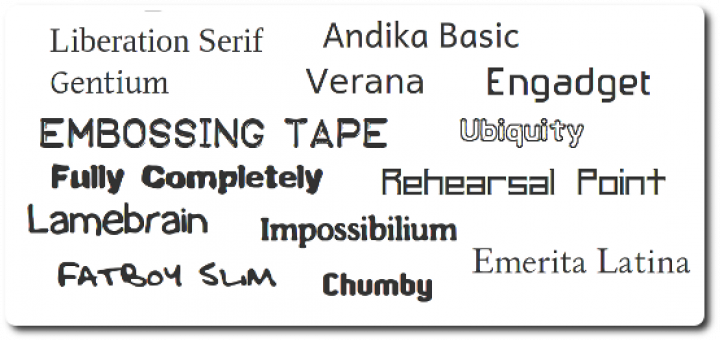
Every now and again, educators ask me where they can get more fonts for Edubuntu. We include great desktop publishing software (scribus-ng, inkscape, gimp, etc) in Edubuntu, but our default font selection is rather dry and uninspiring. A few weeks back I looked whether there are some nice fonts in the Ubuntu archive that we could include. I figured that even if there’s one or two good ones available that we could ship, then it would at least be some improvement. The results were quite surprising, there are a wealth of fonts available in the archives.

I added many of them that seemed useful at face value to the edubuntu-fonts meta-package now available in PPA and soon in Natty. It installs quite a lot of font packages currently. The idea is to cut it down a bit and probably split it into 2 to 4 meta-packages, possibly in the categories I listed below. I’ll include some excerpts from package descriptions, and a few examples too. I can’t possibly list them all, it would make this post way too long.

Educational

Font packages currently included: ttf-essays1743, ttf-junicode, ttf-levien-typoscript, ttf-linex, ttf-marvosym, ttf-oflb-asana-math, ttf-oflb-euterpe, ttf-sil-andika, ttf-ancient-fonts, ttf-inconsolata, otf-stix

ttf-sil-andika

Upstream Homepagehttp://scripts.sil.org/Andika

Andika (“Write!” in Swahili) is a sans serif, Unicode-compliant font designed especially for literacy use, taking into account the needs of  beginning readers. The focus is on clear, easy-to-perceive letterforms that  will not be easily confused with one another. A sans serif font is preferred by some literacy personnel for teaching  people to read. Its forms are simpler and less cluttered than some serif fonts can be. For years, literacy workers have had to make do with fonts that were available but not really suitable for beginning readers and writers. In some cases, literacy specialists have had to tediously cobble together letters from a variety of fonts in order to get the all of characters they need for their particular language project, resulting in confusing and unattractive publications. Andika addresses those issues.

ttf-linex

Upstream Homepage: http://gata.linex.org/trac/browser/ttf-linex/

A collection of fonts including hand-writing simulation typographies, ancient Greek and Roman typographies, institutional fonts from the Extremadura regional government and other elegant fonts.

otf-stix

Upstream Homepage: http://www.stixfonts.org

The mission of the Scientific and Technical Information Exchange (STIX)  font creation project is the preparation of a comprehensive set of fonts that serve the scientific and engineering community in the process from  manuscript creation through final publication, both in electronic and print formats.

Substitutes for popular Non-Free fonts

Font packages currently included: ttf-liberation, ttf-century-catalogue, ttf-mgopen, ttf-beteckna, ttf-droid, ttf-ecolier-court, ttf-ecolier-lignes-court, ttf-bpg-georgian-fonts, ttf-adf-verana, ttf-goudybookletter, ttf-levien-museum, ttf-linux-libertine, ttf-adf-universalis, ttf-adf-tribun, ttf-adf-switzera, ttf-adf-romande, ttf-adf-oldania, ttf-adf-libris, ttf-adf-irianis, ttf-adf-ikarius, ttf-adf-gillius, ttf-adf-berenis, ttf-adf-baskervald, ttf-adf-accanthis, otf-freefont, ttf-symbol-replacement

ttf-liberation

Upstream Homepage: https://fedorahosted.org/liberation-fonts/

This is one of the most well-known sets of substitution fonts. It’s sponsored by Red Hat and includes a set of fonts that are metrically similar to the Times, Arial and Courier fonts. It’s great for document compatibility and can act as a drop-in replacement without requiring the installation of Microsoft fonts.

ttf-symbol-replacement

This is a replacement for the Symbol font as commonly found on Windows systems. It’s from the Wine project and should work as a drop-in replacement.

Desktop Publishing

ttf-engadget, ttf-okolaks, ttf-opendin, ttf-radisnoir, ttf-rufscript, ttf-sil-gentium, ttf-tomsontalk, ttf-atarismall, ttf-breip, ttf-staypuft, ttf-aenigma, ttf-fifthhorseman-dkg-handwriting, ttf-isabella, ttf-sjfonts, ttf-georgewilliams, ttf-femkeklaver, ttf-adf-mekanus, ttf-dustin

These are all font packages that might be useful for desktop publishing in a school or educational environment. The ttf-aenigma font package alone includes more than 450 thematic fonts that could be used for posters, brochures, etc!

Enhanced Usability or Accessibility

Font packages currently included: ttf-tiresias

ttf-tiresias

Upstream Homepage: http://www.tiresias.org/fonts/

This is a family of realist sans-serif typefaces that were designed for best legibility by people with impaired vision at the Scientific Research Unit of Royal National Institute of the Blind in London. This is a family of realist sans-serif typefaces that were designed for best legibility by people with impaired vision at the Scientific Research Unit of Royal National Institute of the Blind in London.

Oh, is that all?

Nope, that’s the beginning. Once we have a good selection of fonts in Edubuntu based on what’s in the archive, we should also extend and find more good fonts to include in the Ubuntu archives.Getting the fonts from the Google Font Directory packaged would be a good next step. If you know of any other sources that we should look into please comment here or on one of the usual Edubuntu communication channels.

SociBook del.icio.us Digg Facebook Google Yahoo Buzz StumbleUpon

Android Progress Upsetting to the Old Gaurd

// October 4th, 2008 // 11 Comments » // Free Software

David and Goliath

Recently Engadget reported that Steve Ballmer were taking shots at Google’s Android platform during his UK media tour. He said that it looked very “version 1″ and that it only has 1 handset maker and 1 provider, while Microsoft’s Windows Mobile OS is supported on 55 manufacturer’s devices over 175 networks. He also aparently called Microsoft a David compared to Google’s goliath. That’s actually quite a big complement to the Android product, even if it wasn’t meant so. Ballmer said that because the software is version 1, and looks and feels that way, other handset manufacturers won’t be interested in it.

Android Adoption

Motorola, currently ranking 3rd in terms of global market share in handset makers, have announced that they are seeking to hire 300 developers to work inside Motorola developing on Android. That’s quite a big announcement, and a big bet for Motorola considering that their market share has been slipping in recent years. Motorola’s current high-end phones are already running a Linux kernel, so hopefully there will be a new range of consumer phones from them soon that are much more open than their older ones.

Android is not Microsoft’s only threat

Nokia, who is currently the world’s biggest handset manufacturer, has acquired the Symbian operating system (which currently runs on most of the high-end Nokia handsets) and have announced that they will be releasing the code under a free license. Not only will Nokia be selling Symbian as an open source operating system on their phones, but they are also develop a platform called Maemo which is a Linux system they sell with their tablet phones.

Samsung, currently second in terms of global market share, and LG who is currently 4th have also made big bets on Linux using the Access Linux Platform on 18 different phones.

Maybe Steve has a point?

When I first read the about Ballmer making the David and Goliath anology, I thought that it was just a little melodramatic, but with the 4 biggest handset manufacturers showing such a large interest in Linux and Free Software, I would be worried too if I were him. Google has a big opportunity here to make Android more attractive to more handset manufacturers, I hope they don’t mess it up.

And the iPhone?

The iPhone is a good piece of hardware, and even though the software is proprietary, it’s quite good too. A big limiting factor for the iPhone is that its software only runs on Apple hardware, while many of the next-generation systems can run on pretty much anything. This compares to the situation in the 80′s where you could only buy Apple software with Apple computers, and Microsoft operating systems with just about any other x86 PC hardware you could find.

Exciting times ahead

I lost track of my original thoughts in this post, but the next few years in the handset arena will be interesting and will continue to define how we use technology in our day-to-day lives. There will probably be many shake-ups in the years to come, and the industry will probably not be recognisable when we compare it today. I’m glad that the platforms that are used in the phones will become more standardised and use more and more open platforms. It’s a shame that in 2008, users still can’t just send contact details by sms withought having to wonder if the person on the other side will be able to open it. I think that in 5 years from now, we’ll be able to sync our devices and make them talk to each other in ways that simply wouldn’t have been possible with the old proprietary systems that we used to use.

SociBook del.icio.us Digg Facebook Google Yahoo Buzz StumbleUpon

Totally getting a GNUphone

// September 23rd, 2008 // 7 Comments » // Free Software, Humour

While some people are getting all excited about the Google Android-based phones, I’m going to opt for something way cooler:

The Free Software Foundation (NASDAQ: RMS) has announced the Free Software alternative to the evil, DRM-infested, locked-down, defective-by-design iPhone: the GNUPhone.

The key technical innovation of the GNUPhone is that it is completely operated from the command line. “What could be more intuitive than a bash prompt?” said seventeen-year-old Debian developer Hiram Nerdboy. “The ultimate one-dimensional desktop! Just type dial voice +1-555-1212 –ntwk verizon –prot cdma2000 –ssh-version 2 -a -l -q -9 -b -k -K 14 -x and away you go! Simple and obvious!”

The phone should be able to make actual phone calls by 2011 to 2012.

SociBook del.icio.us Digg Facebook Google Yahoo Buzz StumbleUpon

Default packages

// August 25th, 2008 // 8 Comments » // Free Software, Jonathan

The Mother

My mother have been using Ubuntu on her desktop PC since just after Ubuntu 7.04 has been released. My mother doesn’t do much on her PC, she manages photos, browses the web, reads e-mail, keeps in touch with Pidgin and plays the occasional game. About 3 months ago, she bought a new laptop with Vista. I thought she’d get along with it fine, and with me being so far away from home so much these days, I thought she’d be fine. Well, she wasn’t. In fact, the laptop has been lying in a cupboard because she just couldn’t get things to work on it. She’s been visiting over the weekend, so I installed Ubuntu 8.04 on it, and she’s very happy with it. She’s been telling everyone how nicely her laptop is working now since I’ve “upgraded” it :)

I did a Google search to find what people install on their mother’s machines, but couldn’t find anything really helpful. These are the packages I installed on my mother’s laptop:

  • thunderbird
  • gnome-ppp
  • some games from universe

I then just added some bookmarks to Firefox for the sites she often visits, configured Pidgin and Thunderbird, added a photo to her session info and imported all her music into Rhythmbox. So far everything is working very nicely.

The Server

These are packages I usually install on servers. Not all of these packages usually gets installed on all servers though. These are just a few favourites.

  • screen
  • mc
  • htop
  • debmirror
  • irssi
  • debootstrap
  • vim
  • toilet
  • figlet
  • openssh-server
  • ethstatus
  • ddclient
  • apache2
  • nmap
  • rkhunter
  • postfix
  • traceroute
  • links2
  • sshfs
  • strace
  • gpw
  • ccze

The Desktop

At least, my desktop, plus the packages on the server list.

  • wireshark
  • thunderbird
  • network-manager-openvpn
  • quanta
  • agave
  • build-essential
  • k3b
  • nautilus-open-terminal
  • fakeroot
  • freemind
  • debhelper
  • devscripts
  • strace
  • liferea
  • vlc
  • virtualbox

If there’s something else I should install by default and don’t know about, please leave a comment :)

SociBook del.icio.us Digg Facebook Google Yahoo Buzz StumbleUpon

Wine project announces first release candidate

// May 10th, 2008 // 7 Comments » // Free Software

The Wine project has announced the first release candidate for Wine, the free Windows API for Unix/Unix-like systems (and even non-unix systems like MS Windows itself and ReactOS). The Wine project started in 1993, which makes this release candidate 15 years in the making.

With so many excellent software for Linux systems these days, and the combination of powerful desktop hardware with great free virtualisation suites such as Virtualbox, people often ask me what the actual benefit of having a complete and stable free Windows API is. The ones I could think of is:

  • Gaining the benefits of free software. This comes down to having the ability to fix bugs yourself, or getting someone else to fix them for you. A company might have to run some legacy software under Windows, and Microsoft itself might not find it financially beneficial to fix a certain bug in their system. You could then switch to a free API and if the bug is present there as well, have it fixed. Since Wine does not run Windows under an emulator (or run Microsoft Windows at all), you do not need a Windows license, which you would need if you would run Windows under KVM/Virtualbox/VMWare/etc.
  • Beneficial to ReactOS (and similar projects). ReactOS is an attempt to completely re-write the entire Windows operating system, including boot loader, registry. kernel and user interface. ReactOS uses Wine for its Windows API. ReactOS is currently in early alpha state, and plans to release an alpha that is roughly 70% of a Windows NT 5 (Windows XP) kernel by the end of 2008.
  • Allows software vendors to dip their toes into cross-platform support. Software vendors such as Google have ported software such as Picassa and GoogleEarth to Linux-based systems using Winelib. Using Winelib, a software vendor can package their software to run on non-Windows systems at a fraction of the cost of what a rewrite or proper port would cost. While this may be a short-term solution for some providers, it may give them a market lead boost by being able to provide to a large audience rather sooner than later.
  • Commercial Wine support providers such as Crossover or Transgaming (see Tom’s comment below). These companies patch Wine to provide additional support for certain software and also provide user interfaces to allow easy installation and configuration of Windows software. The software released by these type of companies are usually proprietary software.
  • Performance and integration. Even though desktop hardware has become cheaper, and virtualisation software offers more and more nice features such as ‘seamless’ window mode, running a complete additional operating system does come at a performance hit. At the very least, it will typically consume a dedicated amount of memory. Unless you do fancy tricks with shared directories between the host and guest systems, you also don’t get tight desktop integration with the software running in the guest. Running your legacy software under Wine allows you to get past some of these problems.

That’s the immediate benefits I could think of from having a free, stable Windows API available. There are probably more, and while I think that we probably won’t care about this anymore 10-15 years from now, considering all the next-generation cross-platform programming tools that are available now, I do think that the coming of age of the Wine project will be welcomed by many, and will provide many companies and individuals plenty of short-term benefits while the computing landscape transforms.

SociBook del.icio.us Digg Facebook Google Yahoo Buzz StumbleUpon